

The AI voice agent for WordPress
Install the plugin, connect your account, and StudioMeta talks and chats with visitors on your site around the clock — reading your content, booking appointments, and, on a WooCommerce store, answering real order status and product questions straight from your store data.
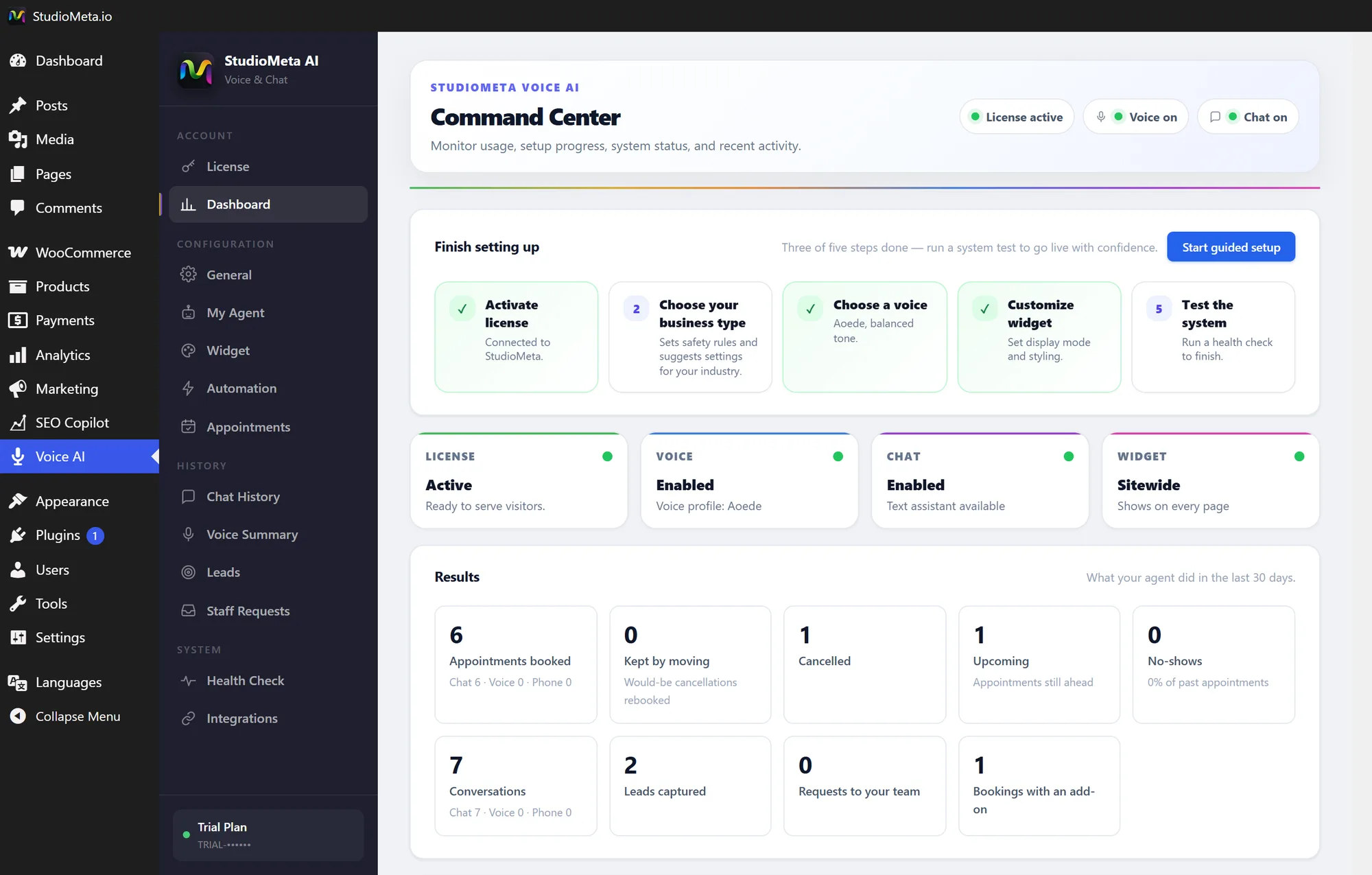
Inside the plugin
Everything one agent needs to run your front desk
One install brings the voice engine, the chat widget, and the automations that connect them to the rest of your business.
AI voice calls
Answers visitors right on your site, around the clock, in a natural voice you pick to match your brand.
AI live chat
The same agent, in a chat widget — picks up context wherever the visitor left off.
WooCommerce Assistant
Looks up real order status and tracking, answers product questions from your catalog, and offers approved coupons — straight from your store data.
Phone calls (paid plans)
Connect your own Twilio number and the same agent answers real calls to it. You pay Twilio directly for minutes and the number — call time counts against your normal monthly voice minutes.
Keep your business number
No need to move it to Twilio: forward the number your customers already call to your agent, on every call or only when you don't pick up. The plugin shows the codes for your phone company. Needs a connected Twilio number.
Urgent alerts
When the agent marks a request urgent, your team hears about it at any hour: a post in your Telegram group, plus a call and a text from your own Twilio number. Off until you turn it on.
Appointment booking
The agent checks your working hours and books real slots on the spot — no calendar tool or webhook to configure. Visitors can move or cancel later by voice, chat or phone, and you get an email for every change.
Google Calendar sync
Connect your calendar in one click — no API key, no developer console. Busy times stay off what visitors are offered, and bookings appear on your calendar automatically.
Services, staff & add-ons
List what you offer and who does it. The agent books the right length with the right person (two staff can both take 10:00) and offers one add-on while booking.
Text reminders & confirmation calls
Optional, from your own Twilio number, and only for visitors who say yes. On a confirmation call the day before, the agent confirms, moves or cancels the appointment.
Week schedule & no-shows
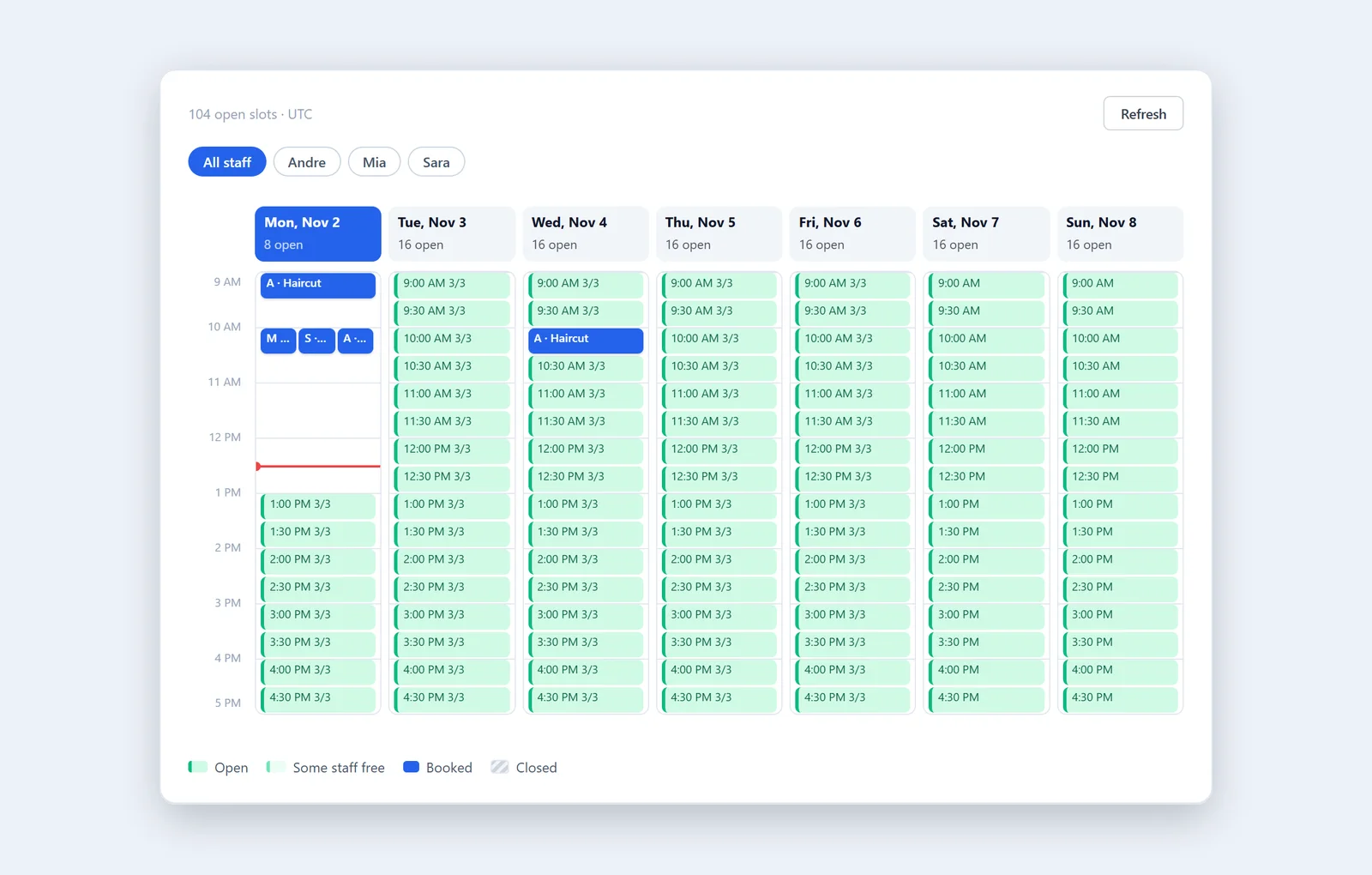
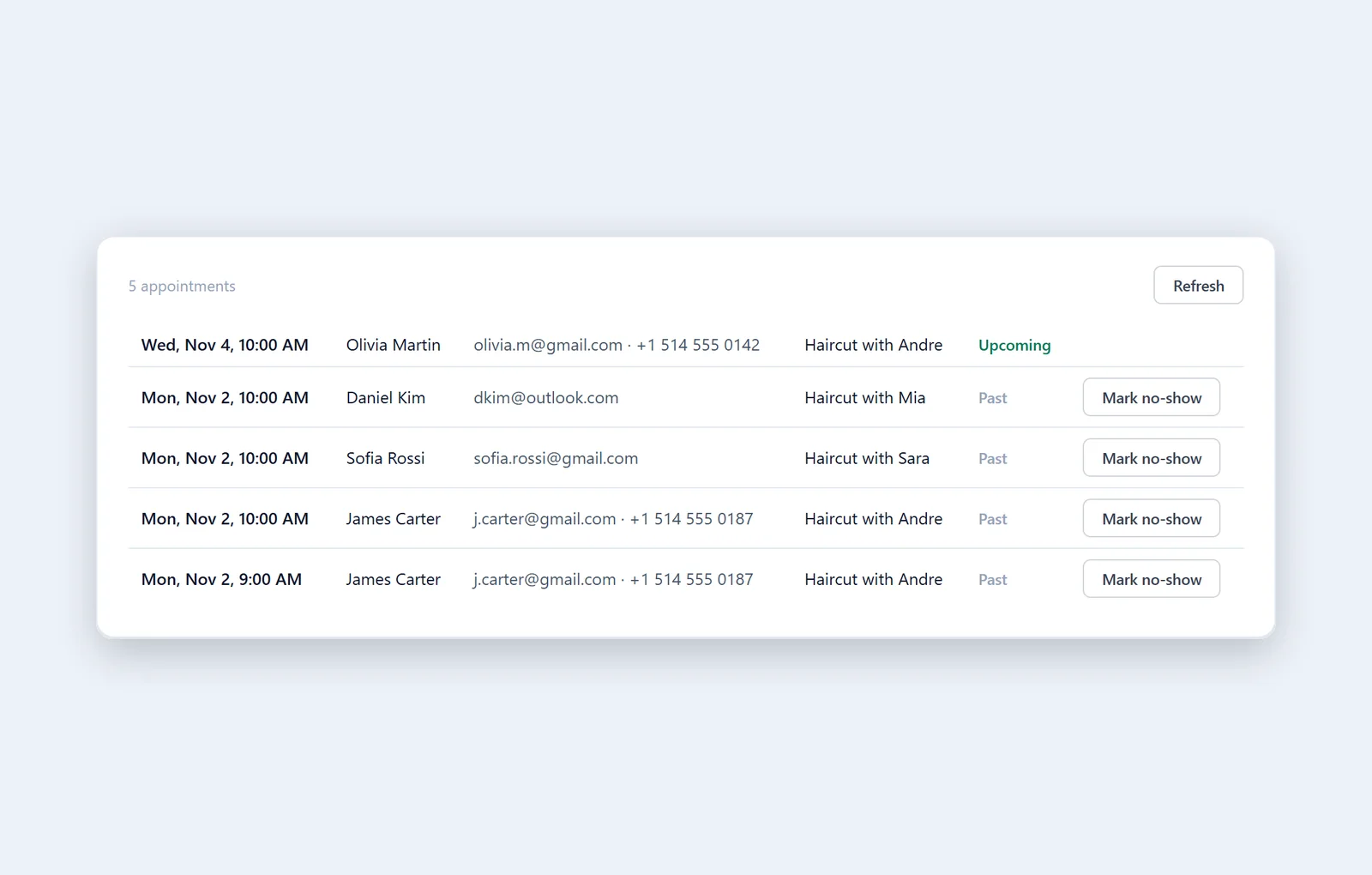
See the week on one time grid in wp-admin, on the WordPress dashboard, or on any page with [smva_schedule], shown only to the people you choose. Mark no-shows, and the agent suggests a reminder next time they book.
Live chat with your team
When a visitor asks for a person, your Telegram group gets the request and the conversation so far. Whoever takes it replies from Telegram while the visitor stays on your site.
Guided setup
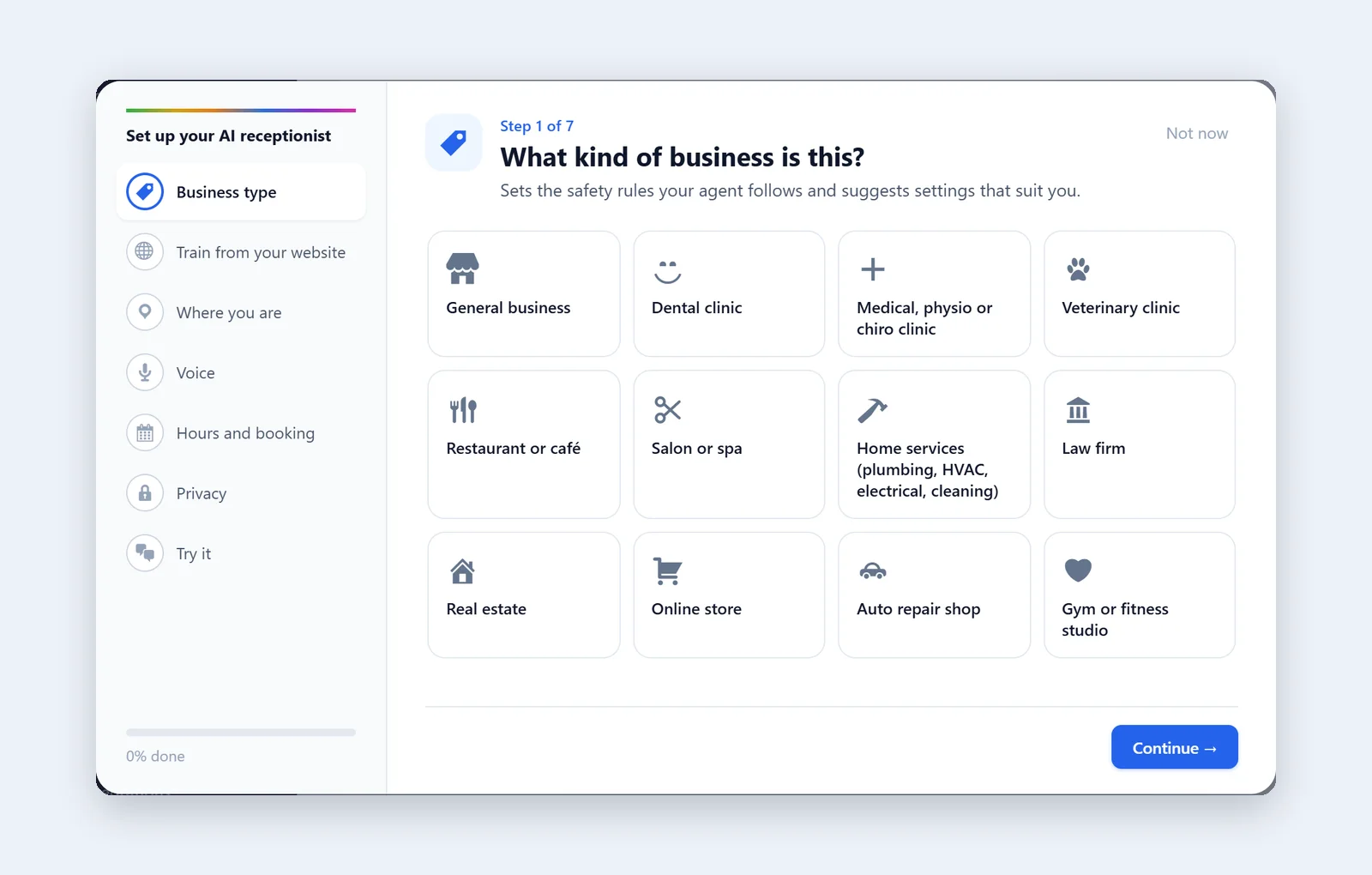
Pick your business type from twelve presets with built-in safety rules, then seven short steps train the agent on your site and end with a live test.
Knowledge base
Point it at your site, docs or PDFs — answers come from what you actually publish.
Smart navigation
Opens the page a visitor asks for, such as pricing or contact, in the middle of the conversation.
Multilingual
Detects the visitor's language and replies in it — no separate setup per market.
Secure cloud
Calls, chats and knowledge base data are encrypted in transit and at rest.
Widget looks & themes
Four launcher styles (floating buttons, pill, capsule or orb) and eight themes, in your brand color and position — no CSS required.
HubSpot integration
Connect your HubSpot account and the leads your website widget captures are added to your contacts, ready for follow-up.
n8n automation
Trigger workflows on any call outcome — no-code, connected to 400+ tools.
Results dashboard
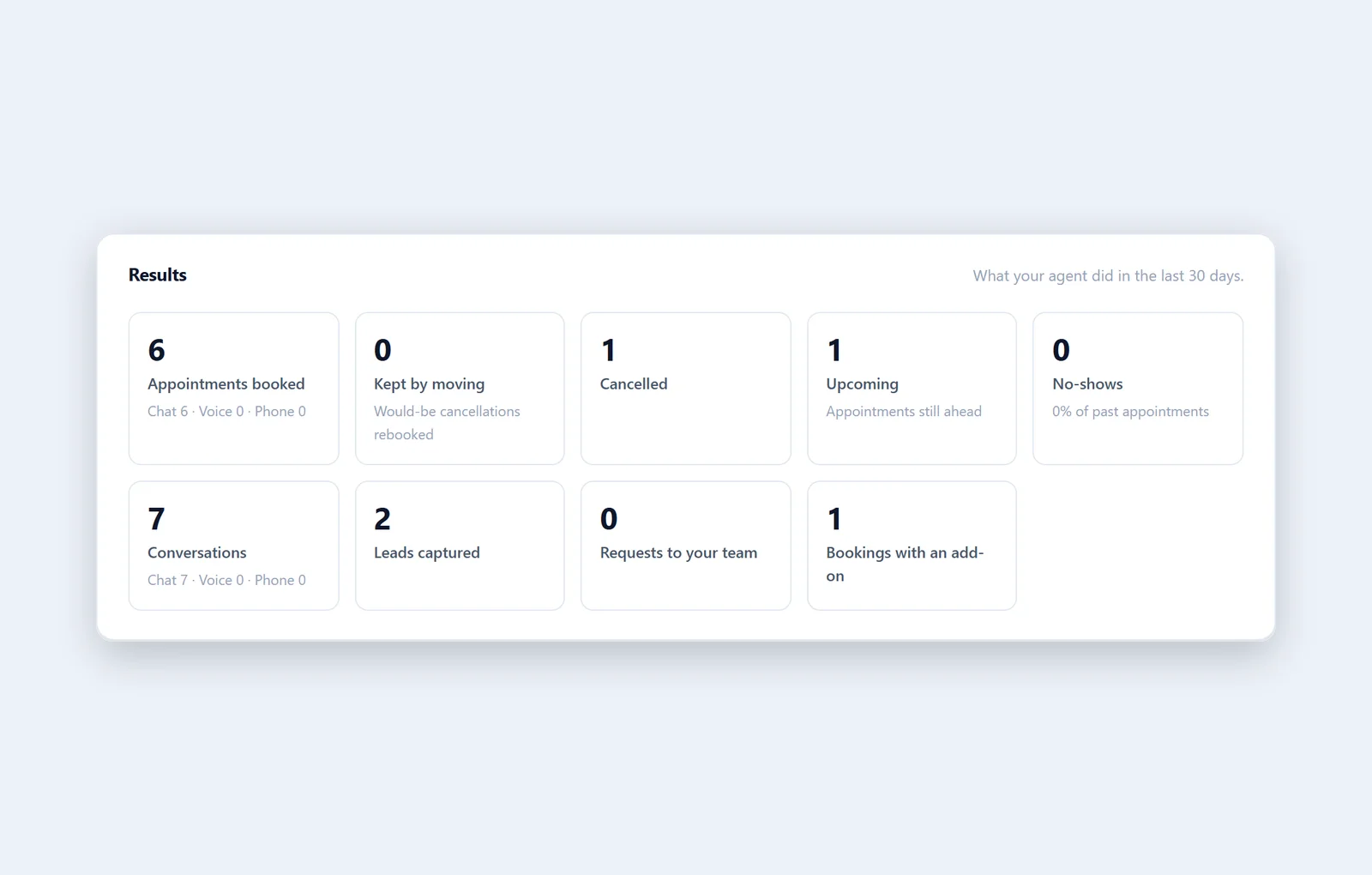
Bookings by chat, voice and phone, cancellations saved by a move, no-shows, leads and team requests for the last 30 days, inside wp-admin.
Setup
Live before your coffee gets cold
Install the plugin
Add StudioMeta from the WordPress plugin directory — no server config, no API keys to wire up by hand.
Follow the guided setup
Start the free trial, pick your business type, and let StudioMeta read your pages. Seven short steps (hours, voice, booking) are saved as you go and end with a live test.
AI answers your visitors
Voice and chat conversations on your site start routing to the agent immediately — 24 hours a day, in every language your visitors speak.
Inside wp-admin
Everything runs from one panel
Set up the agent, manage services and staff, see your week, and track results — all without leaving your WordPress dashboard. No API keys to manage.
Built for your front desk
Whoever calls you, StudioMeta already knows the answer
Compared
A voice agent, not another chat bubble
Pricing
Simple, usage-based pricing
Every plan is monthly and starts with a free trial — no per-site fees, just voice minutes and chat messages.
Chat only
- 2,000 chat messages / month
- Text chat widget
- Knowledge base & lead capture
- 5,000 chat messages / month
- Text chat widget
- Knowledge base & lead capture
- CRM integrations (HubSpot)
Voice + Chat
- 100 voice minutes / month
- 1,000 chat messages / month
- Real-time voice agent
- 300 voice minutes / month
- 2,500 chat messages / month
- Real-time voice agent
- CRM integrations + priority support
Best value bundles
- 100 voice minutes / month
- 2,000 chat messages / month
- Voice + chat, best of both
- 300 voice minutes / month
- 5,000 chat messages / month
- Real-time voice + full chat
- CRM integrations + priority support
Premium engine
- 300 voice minutes / month
- 5,000 chat messages / month
- Higher-quality voice engine — clearer in noisy rooms, more natural pacing
- CRM integrations + priority support
- 300 voice minutes / month
- 10,000 chat messages / month
- Our best voice engine — clearer in noisy rooms, most natural pacing
- CRM integrations + priority support
Need more than 300 voice minutes? Contact us.
All prices in USD, billed monthly, cancel any time. Need a higher-volume plan? Contact us.
From the field
People who used to miss the call
We stopped losing after-hours visitors who used to just close the tab. Bookings from the website widget are up almost 40% since we turned it on.
Installed it during lunch. By the time I checked back, it had already booked two showings and logged both leads in our CRM.
The knowledge base sync is the part that sold me — it answers from our actual menu and hours, not a script someone wrote once.
FAQ
Answers, before you ask twice
No. Install the plugin from the WordPress directory, sign in, and configure everything through settings screens — no API keys to paste in by hand.
From your own site content, plus any documents or pages you point it at. It won't invent policies or hours you haven't published.
Yes — set your working hours once and the agent offers real open slots during the call or chat, confirms by email with a calendar file and a cancellation link, and sends a reminder before the appointment. Add your services, staff and add-ons and it books the right length with the right person. Visitors can also move or cancel it in the conversation: a one-time code emailed to them makes sure only they can, and you get an email about every change. Connect Google Calendar for two-way sync, or run it on your working hours alone with no calendar connected at all.
It says so plainly and offers to take a message or hand off to a human, based on the rules you set — it never guesses.
Yes. Connect your team's Telegram group under Voice AI → Staff Requests. When a chat visitor asks for a person, the group gets their request and the conversation so far, and whoever taps "I'll take it" chats with them from Telegram while they stay on your site. If nobody takes it in the time you set, it is saved as a request with a reference and the visitor is told your team will get back to them.
Yes, if you connect your own Twilio number. Turn on text reminders, confirmation calls or both under Appointments. The agent asks visitors who leave a mobile number whether they want them, and only those who say yes get a text or a call the day before, between 9 am and 8 pm. On the call it can confirm, move or cancel the appointment.
Yes. The week view appears on the WordPress dashboard and on any page where you add the [smva_schedule] shortcode. Administrators always see it; tick anyone else who should under Appointments. Everyone else sees nothing.
On every page by default (sitewide), or only where you place the shortcode. Visitors talk or type to it right on your site — no phone number required to get started.
Yes, on paid plans. Connect your own Twilio account under Voice AI → Integrations and give the agent a phone number you own. Your customers can keep calling the number they know: the plugin walks you through forwarding it to the agent. You keep paying Twilio directly for call minutes and number rental — StudioMeta doesn't bill for that separately — and talk time counts against the same monthly voice minutes as the widget.
It detects the visitor's language automatically and responds in it, across dozens of languages, with no extra setup per market.
Yes. Once enabled, the agent can look up a visitor's real order status and tracking, answer questions from your product catalog, and offer any coupon you've approved — all from your store's own data, not a guess.
HubSpot is built in: connect it under Voice AI → Integrations and the leads your website widget captures are added as contacts with name, email and phone. For other tools, connect a custom tool by webhook to n8n, Make or Zapier.
Define a custom tool and connect it via webhooks to n8n, Make or Zapier — so a call or chat outcome can trigger any workflow across 400+ tools.
Calls, chats and knowledge base content are encrypted in transit and at rest, and you can delete any conversation on request.
Yes — every plan starts with a free trial, no card required until you decide to keep it running.
Your front desk, answered — starting today
Install StudioMeta, start a free trial, and let the agent take the next call while you get back to work.